Introduction
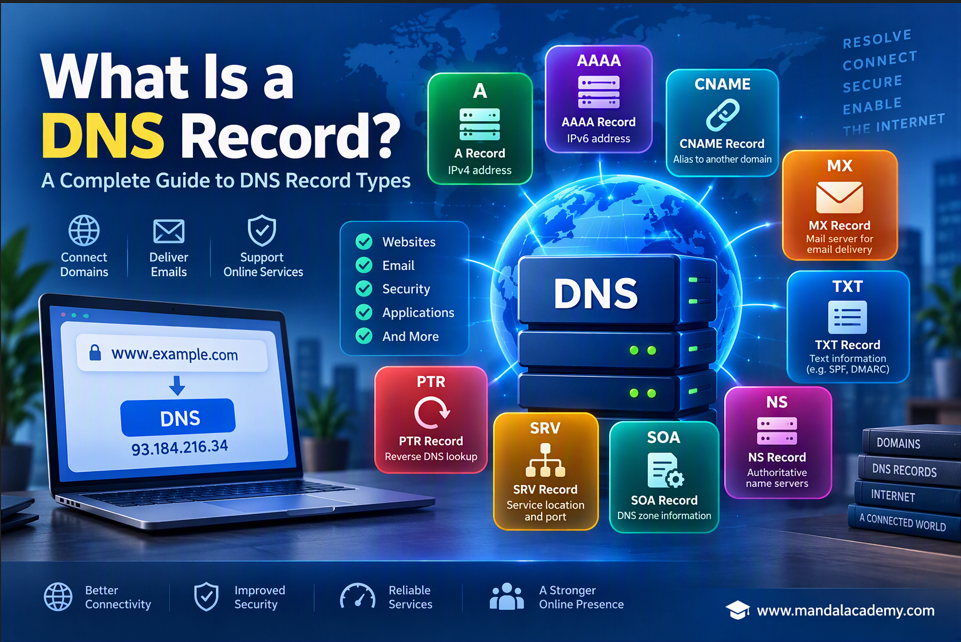
The Domain Name System (DNS) is often referred to as the internet's phonebook. When you type a website address such as www.example.com into your browser, DNS translates that user-friendly domain name into an IP address that computers can understand.
DNS records are the instructions stored within DNS servers that help direct internet traffic, deliver emails, verify domain ownership, and support various online services. Understanding DNS records is essential for website administrators, Microsoft 365 administrators, and anyone working with domains and email systems.
In this article, we'll explore the most common DNS record types and their functions.
Most Common DNS Record Types
1. A Record (Address Record)
An A record maps a domain name to an IPv4 address. It is one of the most fundamental DNS record types and is commonly used to point a website to its hosting server.
Example: mandalacademy.com A 103.86.177.200
Purpose
- Connects a domain to an IPv4 address
- Directs website traffic to the correct server
- Essential for website accessibility
2. AAAA Record
An AAAA record performs the same function as an A record but uses an IPv6 address instead of IPv4.
Example: mandalacademy.com AAAA 103.86.177.200
Purpose
- Maps domains to IPv6 addresses
- Supports modern internet networking
- Enables IPv6 connectivity
3. CNAME Record (Canonical Name)
A CNAME record creates an alias that points one domain or subdomain to another domain name instead of directly to an IP address. It is commonly used in Autodiscover service to help outlook autometically locate mailbox settings.
Example: mandalacademy.com CNAME targetdomain.com
Mailflow:
Outlook Client -> autodiscover.company.com -> CNAME autodiscover.outlook.com -> Exchange Online
Purpose
- Creates domain aliases
- Simplifies DNS management
- Commonly used for Microsoft 365 services and subdomains
4. MX Record (Mail Exchange)
MX (Mail Exchange) Record is a DNS record that tell other mail servers where to deliver emails for your domain.
- Basically it's used to receive email from external domain.
- With the help of MX record we can control the mail flow, we can decide where to move the email. Like office 365 or any other email server.
- We can manage load balancing for more than one email server.
- To check MX record use the cmd "nslookup -type = mx mandalacademy.com"
- In Exchange Online it's point to microsoft mail protection server (EOP), which receive and process incoming email before delivering them to user mailbox.
Example: Priority: 0
example-com.mail.protection.outlook.com
Purpose
- Routes incoming email
- Directs messages to the correct mail server
- Required for Exchange Online and other email systems
5. TXT Record
A TXT record stores text-based information within DNS. These records are widely used for verification and email security purposes.
Example: v=spf1 include:spf.protection.outlook.com -all
Purpose
- Domain verification
- SPF configuration
- DMARC implementation
- Security validation
6. NS Record (Name Server)
An NS record identifies the authoritative name servers that manage DNS information for a domain.
Example: mandalacademy.com NS ns1.provider.com
Purpose
- Defines DNS authority
- Routes DNS queries correctly
- Connects domains to DNS hosting providers
7. SOA Record (Start of Authority)
The SOA record contains administrative information about a DNS zone and identifies the primary authoritative DNS server.
Purpose
- Maintains DNS zone information
- Supports DNS synchronization
- Required for DNS zone management
8. SRV Record (Service Record)
An SRV record specifies the hostname and port number for particular services.
_sip._tls.mandalacademy.com
Purpose
- Locates service endpoints
- Used by Microsoft Teams, Skype, and VoIP services
- Supports service discovery
9. PTR Record (Pointer Record)
A PTR record performs reverse DNS lookups by mapping an IP address back to a domain name.
Example: 192.168.1.10 → mandalacademy.com
Purpose
- Reverse DNS lookup
- Email server reputation validation
- Spam prevention and troubleshooting
===========================================================
===========================================================
Less Commonly Used DNS Records
While the records above are commonly used in daily administration, several specialized DNS records serve unique purposes.
CAA Record
A Certification Authority Authorization (CAA) record specifies which Certificate Authorities (CAs) are permitted to issue SSL/TLS certificates for a domain.
Purpose
- Improves certificate security
- Prevents unauthorized certificate issuance
DNSKEY Record
The DNSKEY record stores public keys used by DNSSEC (DNS Security Extensions) to validate DNS responses.
Purpose
- Supports DNSSEC
- Helps protect against DNS spoofing
CERT Record
A CERT record stores digital certificates and public key information.
Purpose
- Certificate management
- Public key storage
DNAME Record
A DNAME record functions similarly to a CNAME but redirects an entire domain and all its subdomains.
Purpose
- Large-scale domain redirection
- Simplified domain migration
LOC Record
A LOC record stores geographical information associated with a domain.
Purpose
- Latitude and longitude storage
- Geographic resource identification
NAPTR Record
A NAPTR (Naming Authority Pointer) record helps discover available services for a domain and is often used with SRV records.
Purpose
- SIP and VoIP services
- URI generation
- Telecommunications environments
SSHFP Record
An SSHFP record stores SSH public key fingerprints in DNS.
Purpose
- SSH host verification
- Enhanced security for remote connections
RP Record
An RP (Responsible Person) record stores contact information for the administrator responsible for a domain.
Purpose
- Administrative contact details
- Domain management reference
DNS Records Commonly Used in Microsoft 365
| Record Type | Purpose |
|---|---|
| MX | Email delivery |
| TXT (SPF) | Sender authorization |
| DKIM | Email integrity validation |
| DMARC | Email authentication policy |
| CNAME | Autodiscover and service redirection |
| SRV | Teams and SIP services |
| A Record | Website hosting |
| AAAA Record | IPv6 connectivity |
| NS Record | DNS hosting |
| PTR Record | Reverse DNS lookup |
Conclusion
DNS records are the foundation of internet communication. They enable websites to load, emails to reach their destinations, and online services to operate securely and efficiently. While records such as A, MX, CNAME, TXT, and NS are widely used in everyday administration, specialized records like CAA, DNSKEY, NAPTR, and SSHFP provide additional security and functionality.
Whether you're managing a website, configuring Microsoft 365, or troubleshooting email delivery issues, understanding DNS records is an essential skill for modern IT administrators.

Comments (0)
No comments yet. Be the first to leave one!